ReplicantFM1
ReplicantFM1 turns the M-VAVE FM-1 into an acid/techno groovebox: a 909, a Roland SH-101, two 303s and a breakbeat player, all playing at once, in stereo. Each part can play its own pattern, you can arrange patterns into a song, record knob moves, and give single steps a sound and a chance of their own.
1Install
Try it first: the X0X emulator runs the same code in the browser, with sound, played with the mouse, a touch screen or the keyboard.
Install: open the web installer in Chrome or Edge, connect the FM-1 with a USB data cable and press Install. Don't unplug it while it's writing; when it finishes, the FM-1 restarts into X0X.
Update: the same way. An update keeps your project: the patterns, sounds, song and settings. Installing another firmware does not: it keeps its own things in the same memory, so coming back to X0X starts with an empty project. To keep it, save it to a file first (see Back up your project).
Go back: "Back to the stock firmware", at the bottom of the same page, puts M-VAVE's firmware back (download the FM-1 file from the link there, choose it, press the button; if the FM-1 doesn't take it, use the V15 file from the second link). M-VAVE's own updater, M-UPGRADE, works too. M-UPGRADE 3.11 finds this version of X0X, not older ones (it says "A USB MIDI device is present but did not answer"): use the button for those.
Installing other firmware is at your own risk. If the FM-1 ever won't start, see Recovering an FM-1 that won't start.
Install from the command line
Download the firmware file (for example x0x-1.0.fwsc) from the releases page, get the X0X source from GitHub, install Python 3 with pip3 install mido python-rtmidi, and run:
python3 tools/fm1_install.py x0x-1.0.fwsc(The web installer on hugelton.github.io installs Felucca, not X0X.)
2Getting started
A five-minute tour, from switching on to saving your first beat. When X0X starts, the screen shows the 909 and every part is empty.
- Add a kick. Press black key 1 to pick the bass drum (you'll hear it), then press white keys 1, 5, 9 and 13.
- Press PLAY. The kick plays on every beat.
- Add a clap. Press black key 7, then white keys 5 and 13. While the pattern plays, picking a drum is silent, so you don't add a stray hit.
- Add open hats. Press black key 9, then white keys 3, 7, 11 and 15.
- Write a 303 line. Turn ALGORITHM two clicks clockwise to 303A and press ARP. Press OCT+: each press writes a new line. Keep going until you like one.
- Shape the 303. Press EDIT. The knobs are now the 303's filter: KNOB 1 opens and closes it, KNOB 2 sets the resonance.
- Add the break. Turn ALGORITHM two more clicks to BREAK and press all 16 white keys, so the break plays the whole bar.
- Mute a part. Press HOME, then black key 5 to mute the break. Press it again to bring it back.
- Record a filter sweep. Turn ALGORITHM back to 303A and press EDIT. Press REC, slowly turn KNOB 1 for a bar or two, then press REC again. The sweep now plays every time the pattern comes round.
- Save. Press PLAY to stop, then SAVE. Everything is kept when you switch off. (X0X also saves by itself a few seconds after you stop; see section 15.)
Next: section 9 shows how to make more patterns and switch between them, and section 12 how to arrange them into a song.
3Controls
The drawing at the top of the manual names every control. In more detail:
A button that opens a screen always opens the same one; press it again for that screen's next page. SEQ, EDIT and ARP show the part you choose with ALGORITHM.
| Control | What it does |
|---|---|
| MASTER | Volume. |
| SELECT | The previous or next page. In a list, up and down. Hold a step and turn it for the step's chance (section 11). |
| PRESETS | The next pattern: on a part's screen for that part only, on HOME for all five. |
| ALGORITHM | The part: 909, 101, 303A, 303B or BREAK. In a list, it changes the value. |
| OCT-, OCT+ | The steps, 16 at a time (1–16 … 49–64). On HOME and SONG, patterns 1–16 or 17–32. On synth keyboards, the octave. On TB-3PO, mutate the line or write a new one. |
| KNOB 1–4 | The four values at the bottom of the screen. Each click is one step, however quickly you turn a few; spin and they speed up. Hold ENV and turn one to put it back to its default. |
| FX | The reverb and the delay. |
| SEL | Everything on this screen as a list, including the settings on no page (see Lists). In a question, yes. |
| ENV | Hold while pressing keys: an accent. Hold and turn a knob: the knob goes back to its default. |
| LFO | The mixer and the master. Hold while pressing keys: a slide. |
| EDIT | The selected part's sound. The keys still write its steps. |
| GLO | The settings. Press again to close. |
| HOME | The pattern: all five parts, which pattern they play, mutes. Again: the song, and again back. In a list, back; in a question, no. |
| SAVE | Save everything (while playing: when you stop). Hold it to copy the pattern; then a white key pastes it. |
| ARP | TB-3PO, the algorithmic line generator (on SH-101 and 303s). |
| SEQ | The selected part's steps, with its LENGTH and RATE (on synths also piano roll, DIRECTION and TRANSPOSE). |
| PLAY | Start and stop. |
| REC | Record on and off: drum hits, synth notes, knob moves, and on the SONG screen the song. On synths the keys become a keyboard while it's on. |
| White keys | Steps. On HOME, patterns. On synths, white piano keys when playing/recording. |
| Black keys | Drum tracks, or the break's slices. On HOME they mute parts; on the mixer they pick a channel; on synths, black piano keys when playing/recording. |
Hold HOME for these: + REC undoes, + PLAY redoes, + SELECT sets the tempo, + SEQ tapped in time taps the tempo, + a white key picks a pattern from any screen, and + a black key mutes a drum track (on the 909 screen) or a channel (on the mixer).
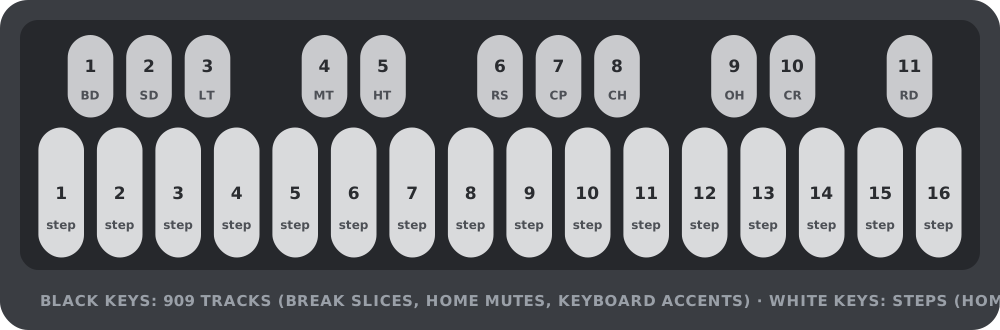
(The SEL button is labelled SCL in Felucca.)
Lists
SEL turns the screen you're on into a list of everything on it: every knob from its pages, grouped (on the 909, for example, BD: THIS TRACK and 909: ALL TRACKS), and then MORE, the settings that are on no page. MORE is where the less used settings live, such as a drum track's DRIVE and DIST or the compressor's details.
In a list, SELECT moves, ALGORITHM changes the highlighted value, and SEL runs a row with a return arrow (an action). HOME goes back. X0X always asks before doing anything that would lose notes: SEL for yes, HOME for no.
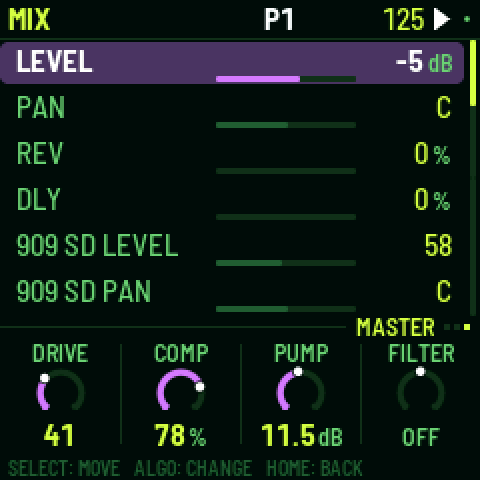
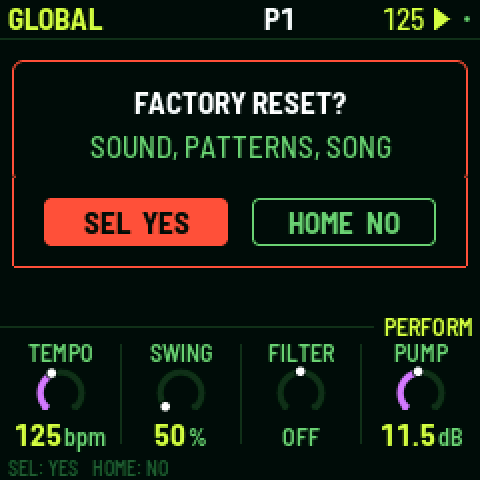
Not sure what a button does? Hold it for a second on its own: a card says what it does on the screen you're on, with its combinations. Let go and nothing happens.
Undo
Hold HOME and press REC to take back your last change; the screen says what it undid, for example UNDO 909 P1. HOME + PLAY redoes it. You can go back up to 32 steps (fewer after very big changes). A step is whatever you did before pausing for a moment: a few steps tapped in a row, one turn of a knob, or a whole recording pass. Undo covers the sounds, patterns, song and knob motion, even CLEAR PATTERN and FACTORY RESET, but not the tempo or the settings. The history is cleared when you switch off.
What the key lights show
The key lights have two levels: bright for what is on or chosen, dim for what is there to choose.
| Screen | Bright | Dim |
|---|---|---|
| HOME | the pattern playing (a cued one blinks); the parts playing | patterns with notes; muted parts |
| SONG | the bar's pattern; the bar's parts | patterns with notes; the bar's muted parts |
| 909 | the track's hits; the track | the other tracks with hits |
| SH-101 / 303 | notes | ties |
| Synths with REC on | the keys you hold | the Cs, to find your place |
| BREAK | the steps it plays | the slice pads 1–8 |
| Mixer (PARTS, 909 MIX) | the channel the knobs set (blinking while muted) | the other channels |
4The screen
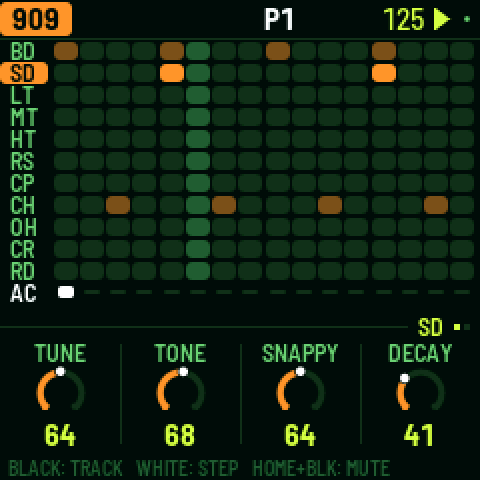
The top line shows, from left to right:
- the part, in its colour (909 orange, 101 red, 303A green, 303B blue, BREAK violet), and the screen if it isn't the sound: SEQ, TB-3PO, or KEYS while synth keyboard recording is on;
- the pattern playing, such as P3. P3 >5 means pattern 5 is coming up next. On a part longer than 16 steps, the steps the white keys show follow (33-48);
- the tempo, amber when X0X follows an external MIDI clock;
- a play symbol while playing and a red dot while recording. A small grey dot means there are unsaved changes.
When a button does something, the top line says what for a second, for example SAVED or P1 PASTED TO P5.
The knobs sit under a tag that says whose they are: the selected track (BD), the whole machine (909 KIT), a 303's sound (303A TONE), the pattern (P3 SEQUENCE), the mixer (PARTS: 303A, 909 MIX: CP), a held 303 step on SEQ (303A STEP 5), or a p-lock (BD P-LOCK STEP 5). When a section has more than one page the tag counts them (BD (1/2)), and the dots at the end of the line are all the screen's pages, the current one lit. Settings with only a few choices show a row of small squares instead of a ring.
When you turn a knob, its value shows in large type for a second, with whose it is: a track's (BD TUNE) or a pattern's (P3 LENGTH). Settings that belong to the pattern change when the pattern does, and are copied with it; the sound stays the same whatever pattern plays.
The footer at the very bottom says what the keys do on this screen (BLACK: TRACK, WHITE: STEP). Until you first press a button it says HOLD ANY BUTTON: WHAT IT DOES.
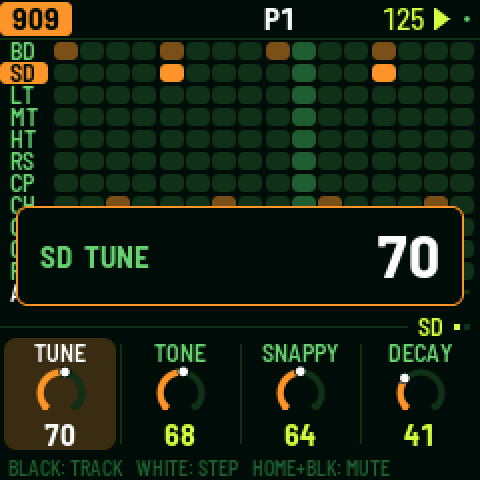
5TR-909
The TR-909 drum machine has eleven tracks, one on each black key:
| Key | 909 Voice | Type | Settings |
|---|---|---|---|
| 1 | Bass drum (BD) | Modelled analog | TUNE, LEVEL, ATTACK, DECAY (page 2: TUNE DECAY) |
| 2 | Snare drum (SD) | Modelled analog | TUNE, LEVEL, TONE, SNAPPY |
| 3 | Low tom (LT) | Modelled analog | TUNE, LEVEL, DECAY |
| 4 | Mid tom (MT) | Modelled analog | TUNE, LEVEL, DECAY |
| 5 | High tom (HT) | Modelled analog | TUNE, LEVEL, DECAY |
| 6 | Rim shot (RS) | Modelled analog | LEVEL |
| 7 | Hand clap (CP) | Modelled analog | LEVEL, TAIL (decay) |
| 8 | Closed hat (CH) | 6-bit Sampled | LEVEL, DECAY |
| 9 | Open hat (OH) | 6-bit Sampled | LEVEL, DECAY |
| 10 | Crash (CR) | 6-bit Sampled | LEVEL, TUNE |
| 11 | Ride (RD) | 6-bit Sampled | LEVEL, TUNE |
The 909's hats and cymbals are 6-bit samples (ER-99), as on the original machine; every other voice is fully synthesized analog emulation. The closed hat cuts off the open hat.
Writing a beat. Press a black key to pick a track; while the pattern is stopped you hear it too. (While it plays, picking is silent so you don't add a stray hit; GLO > KEY SOUND = ALWAYS changes that.) Then press white keys: an empty step turns on, and a tap on a step that's on turns it off. Hold ENV while pressing white keys to place accents instead; an accent makes every drum on that step louder.
A pattern can be up to 64 steps long. The white keys show 16 at a time: OCT+ moves to the next 16 and OCT- back, and the top line shows which 16 you're on.
Muting a track: hold HOME and press its black key; again to bring it back. A muted track's row turns grey. Track mutes aren't saved, and muting the whole part on HOME leaves them as they are.
The pages. EDIT shows the selected track's sound (one page, two for the 909's kick), then KIT with ACCENT, how much louder accented steps are. A track's DRIVE and DIST are in SEL's list, under MORE. SEQ has the machine's LENGTH and RATE. SWING is on HOME, because it swings every part.
Each track's level, pan and reverb and delay sends are on the mixer: press LFO and go to 909 MIX, which shows all eleven levels at once. The black keys pick a track and the knobs are its LEVEL, PAN, REV and DLY.
6Roland SH-101
The Roland SH-101 is a classic monophonic analog synthesizer modelled with a CEM3340 VCO, an IR3109 4-pole ZDF low-pass resonant filter, an ADSR envelope, multi-waveform LFO, VCA ENV/GATE switch, and portamento glide.
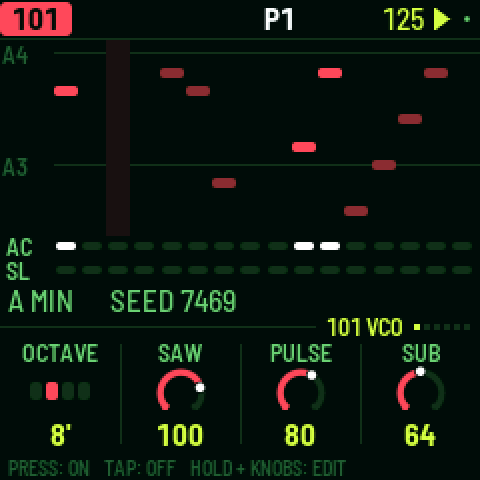
Synthesis Engine Pages
- VCO: -
OCTAVE: Oscillator octave range (16', 8', 4', or 2'). -SAW: Sawtooth wave volume (0–127). -PULSE: Pulse / square wave volume (0–127). -SUB: Sub-oscillator volume (0–127). - PULSE: -
PW: Manual Pulse Width (square 50% to narrow pulse). -PWM SRC: Modulation source (MANmanual,LFO, orENV). -PWM AMT: Depth of pulse width modulation. -NOISE: White/pink noise generator level (0–127). - VCF: -
CUTOFF: 24 dB/oct resonant low-pass filter cutoff frequency. -RESO: Filter resonance (self-oscillates cleanly into a sine wave). -ENVMOD: Depth of ADSR envelope modulation to cutoff. -KYBD: Keyboard pitch tracking amount (0–100%). - ENV: -
ATTACK: Attack time (fast Roland exponential curve). -DECAY: Decay time. -SUSTAIN: Sustain level. -RELEASE: Release time. - MOD: -
LFO RATE: Modulation oscillator speed. -LFO WAVE: Waveform (TRItriangle,SQRsquare,RNDrandom sample-and-hold,NOInoise). -VCF MOD: LFO modulation depth to filter cutoff. -VCA MODE: VCA mode (ENVshaped by ADSR envelope, orGATEkeyed on/off). - VOICE: -
GLIDE: Portamento glide speed between notes. -GLIDE MODE:AUTO(legato slide on overlapping notes),ON(glide every note),OFF. -SUB TYPE: Sub-oscillator shape (-1 OCT SQR,-2 OCT SQR,-2 OCT PLS). -VOLUME: Synthesizer output level. - MORE List (SEL): -
TUNE: Master fine tuning (±100 cents). -ACCENT: Accent intensity (boosts filter cutoff and volume on accented steps). -DRIVE: Analog overdrive distortion. -PAN: Stereo panning (L64 .. C .. R63).
Sequencer & Live Keyboard
- Steps (
SEQ): White keys toggle notes on/off. Hold a step's key to adjust its pitch (KNOB 1), gate (NOTE,REST,TIE), accent (ACC), and slide (SLD). - Keyboard Recording (
REC): Press REC to play the SH-101 live across all 27 keys. Step recording when stopped; real-time recording when playing. - TB-3PO (
ARP): Press ARP to generate algorithmic basslines and lead riffs instantly for the SH-101.
7303A and 303B
There are two identical 303s. Each has its own sound and its own line.
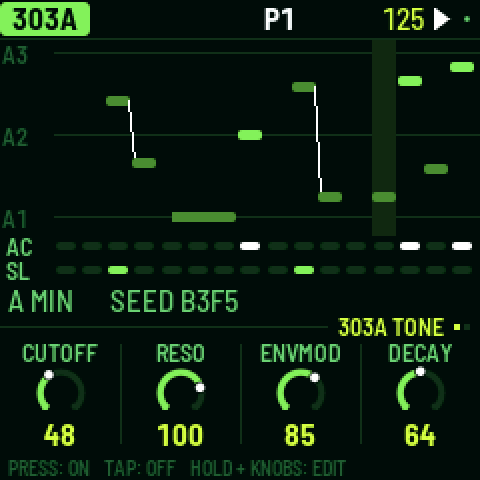
Steps. Press a white key to turn that step on; tap it again to turn it off. To edit a step, press SEQ, hold the step's key and turn the knobs: KNOB 1 sets the note, KNOB 2 the gate (REST, NOTE or TIE), KNOB 3 the accent and KNOB 4 the slide. OCT- and OCT+ move the held note an octave. An empty step turns on as soon as you press it, so you can press, hold and set its note in one go. A slide glides from this step's note into the next one. (Holding a step on EDIT gives it a sound of its own instead: see P-locks in section 11.)
A tie holds the note before it through the step, so it doesn't play again. On the screen a tied note joins the note it holds in one long bar. Turning KNOB 1 on a tie makes it a note of its own.
Keyboard. Press REC and all 27 keys become a keyboard (KEYS shows on the top line). The notes you play are written: step by step while the pattern is stopped, live while it plays. OCT- and OCT+ change the octave. Play a key while still holding another and the 303 slides between them. Press REC again to go back to steps.
Free play. To play the 303 without writing anything, press SEQ, turn SELECT to the KEYS page and set FREE PLAY to ON. The keys then play the 303 on every 303 screen, stopped or playing, so you can try lines and turn EDIT's knobs as you go; the top line says FREE PLAY. Nothing is written until you press REC, which records as above. Set FREE PLAY back to OFF for the steps. Each 303 has its own, and both are off at power-on.
The pages. EDIT has TONE (CUTOFF, RESO, ENVMOD, DECAY) and VOICE (ACCENT, WAVE, saw or square, DRIVE, SLIDE time); TUNE, VOLUME, DRIVE TYPE (off, soft or RAT) and ACCENT DECAY are in SEL's list. SEQ has the line's LENGTH (1–64 steps), RATE, DIRECTION (forward, reverse, ping-pong or random) and TRANSPOSE. Each 303's level, pan and sends are on the mixer (LFO).
8TB-3PO
TB-3PO writes 303 lines for you. Pick a 303 with ALGORITHM and press ARP.
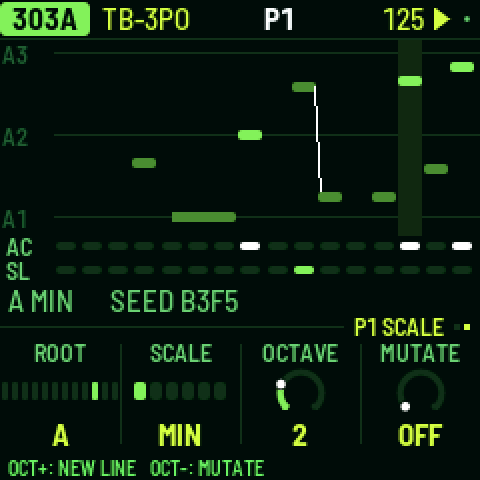
Press OCT+ to write a completely new line, or OCT- to mutate the current one (about a quarter of its steps change).
TB-3PO has two pages (press ARP again, or turn SELECT):
- GENERATE: DENS, ACCENT and SLIDE set how many steps play, are accented and slide. OCTS sets the range, from 1 to 3 octaves.
- SCALE: ROOT, SCALE (minor, Phrygian, harmonic minor, minor pentatonic, Dorian or major), OCTAVE, and MUTATE, which mutates the line by itself every 1–16 bars (or never).
These knobs don't change the line you're hearing. They set up the next OCT+ or OCT-, so your line stays exactly as it is, hand edits included, until you press one. When the knobs no longer match the line, the screen shows NEW LINE with a star. The same settings and seed always give the same line, the same one Schwung's TB-3PO module writes.
To edit the line by hand, press SEQ; to shape its sound, EDIT.
9Break
The break is a drum loop cut into eight slices, which X0X rearranges as it plays.
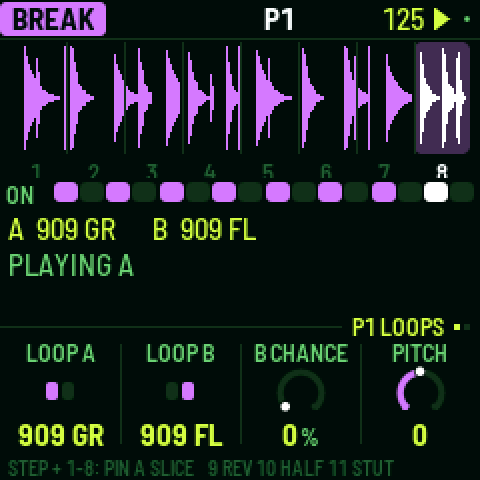
Steps. The white keys are the bar's 16 steps: press one to let the break play there, tap it again to stop it.
Playing slices. Hold black keys 1–8 to play those slices yourself; let go and the generator takes over again. Hold key 9 to play backwards, key 10 for half speed, key 11 to stutter.
A step's own slice. Hold a white key and press black key 1–8: that step now always plays that slice of loop A, from its start, and its box shows the slice's number. Press the same black key again (holding the step) to give it back to the generator. This way you can fix the kick and snare where you want them and let the generator play with the rest.
The generator. SEQ has its two pages, GROOVE and RETRIG:
- COMPLEXITY: how often it jumps to a different slice instead of playing the next one. This is the amount: at 0 the loop plays straight, and ROLL and FILL come in with it, at full effect from 25%, so low settings stay close to the loop.
- ANCHOR: how strongly it keeps the kick and snare slices on beats 1 and 3.
- ROLL: how often it repeats a slice or moves to the one next to it.
- FILL: how much the last bar of a phrase breaks these rules.
- RETRIG 2X, 3X, 4X and 8X: the chance in each bar of stuttering a beat at that rate.
In SEL's list: PHRASE, the length of a phrase (2, 4, 8 or 16 bars, or off), and A LENGTH and B LENGTH, how often a new slice is chosen (every 1/4 bar to every 8 bars).
The loops. EDIT has LOOP A, LOOP B, B CHANCE (the chance of switching to loop B in the last bar of a phrase; with PHRASE off, in any bar) and PITCH. Press EDIT again for FILTER and LEVEL. FILTER is one knob: OFF in the middle, turn it left for a low-pass, right for a high-pass. A high-pass leaves a loop's hats and lets the 909 play the kick and snare. Loops follow the tempo by playing faster or slower, so their pitch follows it too, as on a sampler; PITCH shifts it on top. X0X comes with two loops of its own, 909 GR and 909 FL, played by its 909; loops you upload come after them.
All of these, the steps, slices and loops, are saved with the pattern. The break's level, pan and sends are on the mixer's PARTS page (LFO, black key 5).
Your own breaks
Load your own loops with the break loops page, in Chrome or Edge with the FM-1 connected. They appear after X0X's own loops as BR1, BR2 and so on. There's room for about 21 seconds in all: around nine one-bar loops.
From the command line
With the FM-1 connected, run:
python3 tools/upload_breaks.py --bars amen.wav think.wav funky.wav ...--bars keeps one bar of each file; without it, each file is sent whole. This replaces all your loops. --dry-run FOLDER shows what would fit without the FM-1. If you have schwung-breakbeat next to X0X, --bbgen sends BB Gen's classic breaks. To build loops into the firmware itself, see BUILDING.md.
10Patterns
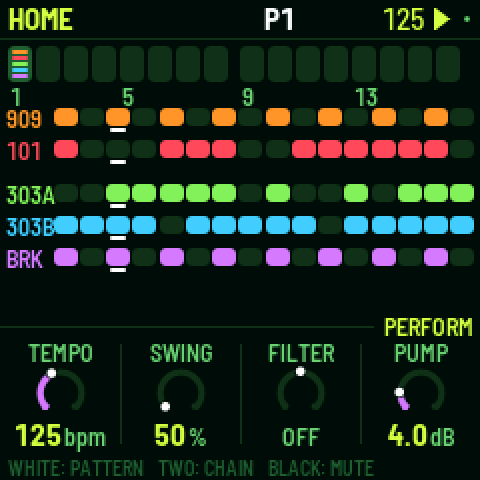
There are 32 patterns. A pattern holds each part's steps, length and rate, the break's settings, the swing, and any knob motion, p-locks and probabilities. Sounds, effects and master settings are not part of a pattern and don't change when the pattern does.
Each part plays its own pattern, so the 303s can play pattern 3 while the drums play pattern 7.
HOME shows patterns 1–16 as boxes, one per white key; OCT+ shows 17–32 (P17-32 appears under the boxes) and OCT- goes back. Every fourth box is numbered. In each box, a line for each part with notes in that pattern: bright where that part is playing it now, dim otherwise.
Choosing patterns
- All five parts: on HOME, press a white key or turn PRESETS. From any other screen, hold HOME and press a white key.
- One part: on that part's screen (SEQ, EDIT, TB-3PO), turn PRESETS.
- A chain: on HOME, hold two white keys at once. All five parts play each pattern from the first to the second, a bar each, then start again. Choosing a single pattern ends the chain.
While playing, the new pattern starts when the current bar ends; stopped, it takes over at once. A part that changes pattern starts again from step 1; the others carry on.
Copy and paste. Hold SAVE: the top line says P1 COPIED. Press a white key to paste onto that pattern (P1 PASTED TO P2): all five parts, as they're playing now. If the pattern you paste onto has notes, X0X asks first. While holding SAVE, OCT- and OCT+ switch between patterns 1–16 and 17–32.
Clearing. Hold SAVE and press REC to clear the selected part in its pattern. GLO > CLEAR PATTERN clears all five.
Muting. On HOME, black keys 1–5 mute and unmute the parts. Mutes aren't saved, except inside a song.
Lengths and swing. Parts can have different lengths, so they drift against each other. The 909's length sets the length of a bar, and the 909's pattern holds the swing, which applies to every part. Swing delays every second 16th note: 50% is straight, 75% the most.
HOME's knobs are for playing live: TEMPO, SWING, and the master's FILTER and PUMP.
Tap tempo. Hold HOME and tap SEQ in time with the beat, from any screen, playing or stopped. From the third tap in a row it sets the tempo; keep tapping and it follows the last four. One or two taps change nothing, so a stray press does no harm. A pause of two seconds starts over. While playing, from the third tap on, each tap also puts the beat on your tap: every part jumps to the nearest quarter note and plays on from there. A tap a little late goes back to the beat just passed; a tap a little early skips ahead to the coming one, and just before the bar line the bar ends on your tap, bringing in the next pattern or the song's next bar. The TEMPO readout shows the result. While X0X follows an external MIDI clock, the clock sets the tempo and tapping does nothing.
11Recording
Press REC to turn recording on, and again to turn it off.
- Drums: while the pattern plays, press black keys to record hits (with REC on you always hear them). Hold ENV for accented hits.
- 303, live: with REC on, the 303's keys are a keyboard; play while the pattern runs.
- 303, step by step: with REC on and the pattern stopped, each key you press fills the next step, from step 1. Hold ENV while pressing a key for an accent, or LFO for a slide. For a rest, hold ENV and press OCT- or OCT+; for a tie, hold LFO and press OCT- or OCT+.
- Knob moves: with REC on and the pattern playing, turn any sound knob (section 11).
- The song: REC + PLAY on the SONG screen (section 12).
12Knob motion, p-locks and probability
All three give steps values of their own, and all three are saved with the pattern.
Knob motion
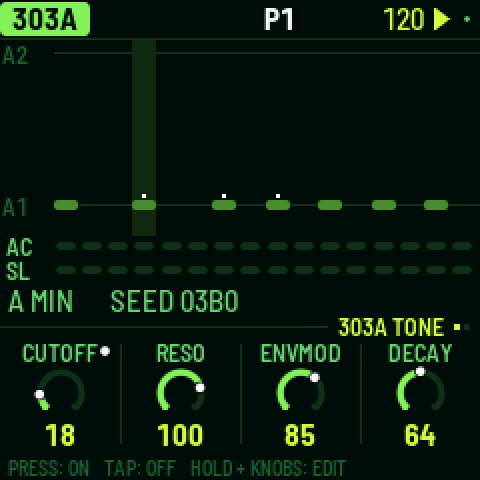
Turn on REC, press PLAY and turn any sound knob. X0X records the knob on the steps where you moved it, fills in short pauses so a slow sweep has no gaps, and on playback glides from step to step.
- A knob with motion has a dot in its corner, and its ring follows the recording as it plays.
- On steps you didn't touch, the knob's own setting plays.
- Turning the knob without REC takes over for one pass of the pattern; then the recording plays again.
- To clear a knob's motion, hold SAVE and turn the knob.
- Motion belongs to a part's pattern: the 303's knobs record into the 303's pattern; the effects and master into the 909's. Copying or clearing a pattern copies or clears its motion too.
- When you stop, every knob goes back to its own setting.
P-locks
A step can have a sound of its own: a higher tune on one kick, an open filter on one 303 note, the break pitched up for one step.
- On EDIT, hold a step that's on and turn a sound knob. That step plays the new value; the others keep the knob's. While you hold the step, the knob row says P-LOCK STEP 5, the knobs show the step's values, and an amber dot marks the locked ones. Stopped, you hear the lock while you hold the step.
- A tap still turns a step on or off: only a hold with a knob turn makes a lock. An empty step turns on as soon as you press it, so you can press, hold and lock in one go.
- To clear one lock, hold the step, hold SAVE and turn the knob.
- On SEQ, holding a step locks nothing (on a 303 the knobs set the step's note instead).
Probability
Hold a step (on SEQ or EDIT) and turn SELECT to set the chance it plays, from 100% down to 5% in steps of 5; the top line shows it (STEP 5: 50%). The dice are rolled every time the step comes round, so 50% plays about every other pass.
Keep turning past 5% for cycles: 1:2, 2:2, 1:3 and so on up to 8:8. A step at 1:4 plays on the first of every four times round its part's pattern, 2:4 on the second; nothing random about it. Each part counts its own passes, from 1 again whenever you press PLAY or it changes pattern.
- On the 909 the chance belongs to the selected track's step, so the kick and the hats on one step can each have their own.
- On synths a skipped step is a rest; on the break, a skipped step doesn't fire.
- A skipped drum hit sends no MIDI note.
Good to know
- Steps with p-locks or a chance below 100% have a small notch on the step grid.
- P-locks and probabilities are stored like recorded motion, one "knob" per locked setting per part pattern. There's room for 160 across all patterns; when it's full, the top line says MOTION FULL.
- Two locked steps next to each other glide from one value to the other, like a recording.
13Song
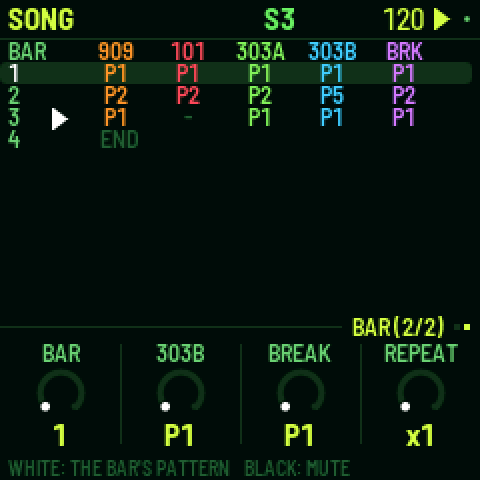
A song is a list of up to 192 bars. Each bar says which pattern each part plays and which parts are muted. To open the song, press HOME twice (HOME again comes back to the pattern).
- Write bars: press a white key. The selected bar gets that pattern for all five parts, and the next bar is selected. Pressing keys at the end of the song adds new bars.
- Edit a bar: turn KNOB 1 to select the bar, then use the other knobs to set each part's pattern for that bar.
- Mute parts in a bar: press black keys 1–5.
- Repeat a bar: on the SONG screen's second page (turn SELECT), REPEAT plays the selected bar up to 8 times (x2 … x8 shows at the end of its row), so four bars of the same pattern are one row.
- Play the song: press PLAY on the SONG screen. The song starts at the selected bar and loops, and keeps playing wherever you go (HOME for mutes, EDIT for sounds) until you stop it. While it plays, the top line shows S and the current bar number. PLAY anywhere else plays the patterns: whatever screen you start from decides, and the top line says which (S or P).
- Record the song: on the SONG screen, turn on REC and press PLAY. As it plays, change patterns and mute parts however you like. Each bar is written into the song as it goes by, starting from the bar you started on, and the song grows if you play past its end. Recording replaces what was in those bars before.
Press SEL on the SONG screen for LENGTH, INSERT BAR, DELETE BAR and CLEAR SONG.
14Effects
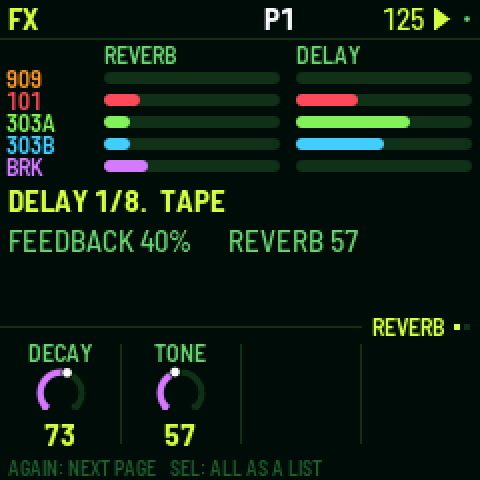
There is one reverb and one delay, and every part can send to both: each part's sends are on the mixer's PARTS page (LFO), each drum track's on 909 MIX. FX shows how much every part sends, and has two pages:
- REVERB: DECAY and TONE. The reverb is a smooth stereo reverb: whatever you send it comes back wide.
- DELAY: TIME (in note values from 1/32 to a dotted half note), FEEDBACK, TONE and TAPE. TAPE at the far left (DIGI) is a clean 12-bit digital delay; turned up, it is a tape delay that wobbles, saturates and wears more the further you turn it, and can feed back on itself at high feedback.
In SEL's list, under MORE: each effect's low cut and return level, and PING WIDTH, which bounces the echoes between left and right: 0 is off, 127 puts them hard left and right, and between, closer together. A new project starts at 20, a narrow bounce.
15Mix and master
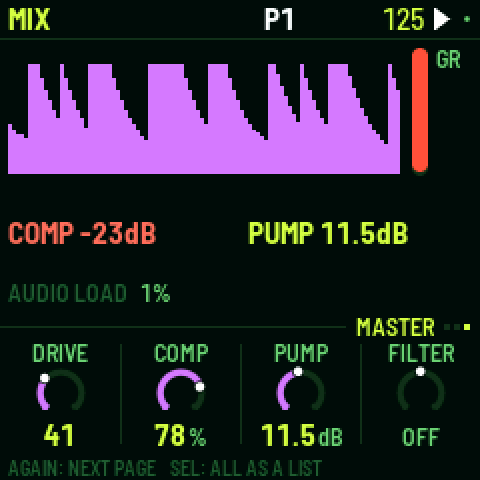
Press LFO to open the mixer; press it again (or turn SELECT) for its pages. The red bar on the right is the compressor's gain reduction.
- PARTS: a level and a meter for each part. Press black keys 1-5 to pick the 909, 101, 303A, 303B or the break; the knobs are its LEVEL, PAN, REV and DLY.
- 909 MIX: the drum machine's mixer, every track's level at a glance; the black keys pick a track, and the knobs set its LEVEL, PAN, REV and DLY.
- MASTER: four knobs over the whole mix. The screen shows the output level over the last couple of seconds, so you can see the pump and the compressor working.
On PARTS and 909 MIX, hold HOME and press a black key to mute or unmute that channel (a part on PARTS, a track on the drum page). The key lights show it: the channel the knobs set is bright (blinking while muted), the others dim, muted ones dark.
Turning ALGORITHM on the mixer goes to that part's page: 909 MIX for the drum machine, PARTS (with the part picked) for the synths and the break.
| MASTER | What it does |
|---|---|
| DRIVE | Saturates the whole mix (the 909's drive stage). |
| COMP | One knob for the compressor: 0 is off; turning up lowers its threshold, raises its ratio and adds makeup gain together. Three quarters is the factory's hard squeeze (4:1 from -24 dB, +16 dB). |
| PUMP | Lowers the whole mix each time the kick plays, by up to 24 dB, and lets it swell back up: the big-beat breathing. Accented kicks pump harder. It works even with COMP at 0, and even when the kick is muted, so a silent kick can drive it. Driven by the 909 kick drum. |
| FILTER | One knob: in the middle it's off; to the left a low-pass closes down, to the right a high-pass opens up. |
FILTER and PUMP are also on HOME's PERFORM page, for playing live.
The factory mix is set up for big beat: the break up front with the 909 kick under it, the 303s through RAT distortion into a tape delay, reverb on the clap. For a clean mix, set COMP and PUMP to 0.
The master in detail
In SEL's list, under MORE: the compressor's THRESH (-48 to 0 dB), RATIO (1:1 to 20:1 and INF), ATTACK (0.1 to 100 ms), RELEASE (10 to 1500 ms), MAKEUP (0 to 24 dB) and MIX (dry to fully compressed, for parallel compression); the filter's RESO; LIMIT, which prevents clipping (leave it on); and the drive stage's DIST type, its GLUE compressor and VOLUME. Turning COMP or FILTER sets their details again.
16Settings and saving
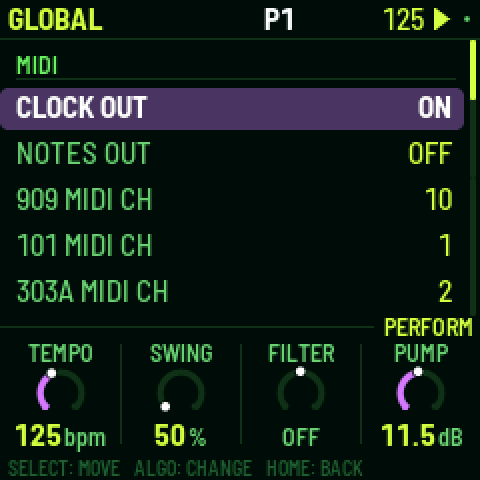
Press GLO for these settings, in five sections (MIDI, AUDIO, KEYS AND SCREEN, PROJECT, SYSTEM):
| Setting | What it does |
|---|---|
| CLOCK OUT | Sends MIDI clock and start/stop messages. |
| NOTES OUT | Sends the patterns out as MIDI notes. |
| 909 … BREAK MIDI CH | Each part's MIDI channel, for notes and CCs in and out: 1–16, or OFF to ignore incoming notes and CCs for that part (and send none). |
| CC OUT | OFF (the default): X0X sends no CCs. KNOBS: the knobs you turn go out as CCs. ALL: what knob motion and p-locks play goes out too. For details, see section 17. |
| MIX MIDI CH | The channel for the mixer's levels, the effects and the master: 1 (the default) to 16, or OFF. |
| OUTPUT | NORMAL, or LOUD: 6 dB more at the headphones and line out (and USB audio), for headphones that need it. The master's LIMIT (on by default) keeps it from clipping. |
| USB AUDIO | FOLLOWS KNOB (the default): USB audio is as loud as the FM-1, MASTER knob and all. FULL: USB audio stays at full level whatever the knob says, so you can record over the cable with the speaker turned down. |
| LIGHTS | ON: the key lights show the steps, and the unlit buttons glow dimly so they can be read. KEYS: the key lights only. OFF: neither. |
| KEY SOUND | STOPPED (the default): picking a drum or editing a synth step is silent while the pattern plays, unless REC is on. ALWAYS: you always hear it. Synth keyboards always play either way. |
| THEME | The screen colour: green, amber, cyan, red or mono. |
| SAVE PROJECT | Saves everything. |
| AUTOSAVE | ON (the default): while the pattern is stopped, changes are saved by themselves once nothing has been touched for four seconds. OFF: only SAVE saves. |
| CLEAR PATTERN | Clears all five parts of the current pattern. |
| FACTORY RESET | Goes back to the factory sounds and empty patterns, with no song and no knob motion. Your saved project is kept until you save over it. |
| PERFORMANCE | Opens the performance page (below). |
| 2ND CORE | ON (the default): ReplicantFM1 uses both of the FM-1's processor cores. OFF: one core. Takes effect the next time you switch on. ReplicantFM1 sets it to OFF by itself if it crashes with two cores (see the performance page, below). |
| ABOUT X0X | Shows the version, how full the memory for patterns is (MEM), and the audio load. |
| BATTERY | The battery's charge: FULL, 2/3, 1/3 or EMPTY; USB POWER while a computer powers the FM-1. Read only. |
Saving
SAVE saves the sounds, all 32 patterns, the song, the knob motion, the tempo and the settings. A small grey dot at the top right of the screen means there are unsaved changes, and anything unsaved is lost when you switch off.
With AUTOSAVE on (the default) you'll rarely need SAVE: whenever the pattern is stopped and nothing has been touched for four seconds, ReplicantFM1 saves and says AUTOSAVED.
ReplicantFM1 never saves while playing. Saving pauses the sound for a moment (the FM-1 plays from the same memory it saves to), so a SAVE pressed while playing says SAVES WHEN STOPPED and saves when you stop.
How much fits
ReplicantFM1 packs the patterns, the song and the knob motion to fit them in the FM-1's memory; empty steps take almost no room, so a typical project uses a small part of it (GLO > ABOUT X0X shows how much, as MEM). If a project ever grows too big to fit, the screen says MEMORY FULL: NOT SAVED and keeps what was saved before; clearing patterns you don't need makes room.
Performance: how hard the FM-1 is working
GLO > PERFORMANCE shows how hard the FM-1 is working, updated every second: the audio load and its peak, any dropouts, and how much of the processor each part is using.
For a proper measurement, press SEL and choose RUN PERF TEST. ReplicantFM1 plays three patterns of its own for about 15 seconds, from a simple loop up to everything as busy as it gets, then puts your project back exactly as it was and shows the results. HOME or PLAY stops the test early.
ReplicantFM1 uses both of the FM-1's processor cores: the Roland SH-101 and the break run on Core 2, while the 909, dual 303s, Master bus, FX and mixer run on Core 1. This balances CPU load under 70% across both cores even during peak dense playback.
The top right of the performance page says 2 CORES. On some FM-1s the second core reads its work wrongly; ReplicantFM1 notices the first time and carries on with one core, and the page says 1 CORE: BAD READS in red. Everything still works, but the busiest patterns may drop out.
If ReplicantFM1 crashes while both cores are running, it restarts with one core and sets GLO > 2ND CORE to OFF, so it doesn't crash again; the page then says 1 CORE (GLO). To try two cores again, set 2ND CORE to ON and switch the FM-1 off and on. After a crash while starting, ReplicantFM1 also starts on one core, once.
Under the cores, the page shows the voltages ReplicantFM1 runs the processor's two supplies at: 1.38 / 1.60V, the same as M-VAVE's own firmware. The FM-1's boot loader starts them lower, at 1.26 / 1.40V; at those voltages some FM-1s misread their memory when both cores are busy.
When the FM-1 gets close to its limit, ReplicantFM1 lightens the load by itself instead of dropping out: the 303s stop oversampling (bright, resonant notes get a touch grittier). While this is happening, GUARD lights up in amber next to the audio load; it switches off again after three quiet seconds. The performance page counts how often it has kicked in (GUARD 3x).
If X0X drops out on one of your patterns, a photo of the test results and of the pattern is the most useful thing you can send.
If X0X crashes, it shows a red screen for a few seconds and starts again. Until you switch the FM-1 off, the performance page keeps that crash's numbers in red at the bottom (CRASH PC … RA …, EMU … DBG …). A photo of them is the most useful thing to send with a crash report.
KNOB 1 turns on some extra counters (STALLS). They're experimental: if the FM-1 acts up with them on, switch it off and on again.
Back up your project
X0X keeps one project. To keep more, or to keep yours while you try other firmware, save it to a file on your computer and load it back later. Open the backup page in Chrome or Edge, with the FM-1 connected by USB.
Back up: press Back up. The project goes to an .x0b file in your downloads: the sounds, all 32 patterns, the song, the knob motion, the tempo and the settings. X0X can keep playing, but changes it hasn't saved yet go in the file only when it's stopped.
Restore: stop X0X, choose a backup and press Restore. X0X checks the whole file before anything changes. Then its screen asks RESTORE FROM USB? Press SEL to restore, or HOME to keep what you have. The backup replaces the project on the FM-1, and X0X loads it at once.
A backup doesn't hold your break loops. Keep their WAV files, and load them again on the break loops page. A backup made with an earlier version of X0X restores in a later one.
From the command line
With the FM-1 connected, run:
python3 tools/x0x_backup.py backup my-song.x0b
python3 tools/x0x_backup.py restore my-song.x0b
python3 tools/x0x_backup.py info my-song.x0b shows what a backup holds. The files are the same as the backup page's.
17MIDI and USB audio
When connected over USB, the FM-1 shows up as a MIDI device called "X0X FM-1".
X0X takes MIDI from USB and from the FM-1's TRS MIDI IN jack, both the same way. Each part listens on its own channel; these are the defaults:
| Input | What it plays |
|---|---|
| Channel 10 | The 909, with General MIDI drum notes: 36 kick, 38 snare, 41, 45 and 50 toms, 37 rim, 39 clap, 42 closed hat, 46 open hat, 49 crash, 51 ride. |
| Channel 1 | The Roland SH-101. Overlapping notes slide (legato glide), and a velocity of 100 or more plays an accent. |
| Channel 2 | 303A. Overlapping notes slide, and a velocity of 100 or more plays an accent. |
| Channel 3 | 303B, in the same way. |
| Channel 4 | Notes 36–43 play break slices 1–8. |
| Clock | Follows incoming MIDI clock automatically, and returns to internal tempo half a second after clock stops. Start, Stop and Continue start and stop the patterns. |
GLO sets each part's channel (909 MIDI CH and so on), or OFF to ignore its notes, for example when another box sends you its clock with notes on the same channels. ReplicantFM1 can also send MIDI: clock and start/stop when CLOCK OUT is on, and the patterns as notes on each part's channel when NOTES OUT is on.
While following an external clock, the tempo on the top line is averaged over about a second, so it doesn't flicker with every clock.
MIDI CC
A controller can turn knobs with MIDI CCs. Each part takes its CCs on its own channel, the same one as its notes, and MIX MIDI CH takes the mixer, the effects and the master. A CC sets its knob just as turning it would, whatever page is showing. While REC is on during playback, it records knob motion. Otherwise it sets the knob, and if the knob has motion in the pattern, the CC wins over it for one pass. A sweep of CCs is one undo step. The map is fixed: there is no MIDI learn.
On the Roland SH-101 channel (Channel 1 by default):
| CC | Parameter | CC | Parameter |
|---|---|---|---|
| 74 | CUTOFF | 85 | OCTAVE (16', 8', 4', 2') |
| 71 | RESONANCE | 86 | PWM SOURCE (MAN, LFO, ENV) |
| 77 | ENV MOD | 87 | PULSE WIDTH (PW) |
| 90 | KEYBOARD TRACK (KYBD) | 88 | PWM AMOUNT |
| 14 | VCF MOD (LFO) | 15 | VCA MODE (ENV, GATE) |
| 81 | SAW LEVEL | 76 | LFO RATE |
| 80 | PULSE LEVEL | 28 | LFO WAVE (TRI, SQR, RND, NOI) |
| 82 | SUB LEVEL | 5 | GLIDE / PORTAMENTO TIME |
| 84 | SUB TYPE | 65 | GLIDE MODE (AUTO, ON, OFF) |
| 83 | NOISE LEVEL | 29 | ACCENT |
| 73 | ATTACK | 78 | DRIVE |
| 75 | DECAY | 31 | VOLUME |
| 79 | SUSTAIN | 30 | TUNE |
| 72 | RELEASE | 10 | PAN |
| 7 | LEVEL | 91, 93 | REVERB SEND, DELAY SEND |
On the other parts' channels:
| CC | 303A and 303B (CH 2, 3) | 909 (CH 10) | Break (CH 4) |
|---|---|---|---|
| 7, 10, 91, 93 | Part level, pan, reverb send and delay send | The same | The same |
| 16–19 | CUTOFF, RESO, ENVMOD, DECAY | 16 FILTER, 17 LEVEL, 18 PITCH | |
| 20–23 | ACCENT, WAVE, DRIVE, SLIDE | 20–30: TUNE of tracks 1–11 | |
| 24–27 | TUNE, VOLUME, DRVTYP, ACCDEC | ||
| 74, 71, 75 | CUTOFF, RESO, DECAY aliases | 74: FILTER alias | |
| 70–80 | DECAY of tracks 1–11 | ||
| 102–112 | LEVEL of tracks 1–11 | ||
| 12 | Kit ACCENT |
The drum tracks count in screen order: BD, SD, LT, MT, HT, RS, CP, CH, OH, CR, RD. The 909 clap's DECAY is its TAIL, and the 909 rimshot has no DECAY, so CC 75 does nothing on channel 10.
On MIX MIDI CH:
| CC | What it sets |
|---|---|
| 16–19 | The MASTER page: DRIVE, COMP, PUMP, FILTER (64 is off) |
| 74, 71 | The master's FILTER again, and its RESO |
| 20, 21 | The reverb's DECAY and TONE |
| 22–25 | The delay's TIME, FEEDBACK, TONE and TAPE |
| 102–106 | The level of the 909, 101, 303A, 303B and break |
A switch such as WAVE changes at 64. CC 120 (all sound off) and CC 123 (all notes off) on a part's channel let go of the notes that MIDI holds there.
X0X sends CCs when CC OUT (GLO) is on. KNOBS sends a knob's CC each time you change it by hand, with a knob, a row in a SEL list, or ENV and a knob. A CC that came in is never sent back, so a DAW that echoes MIDI doesn't loop. A part's level goes out twice, as CC 7 on the part's channel and as 102–106 on MIX MIDI CH. ALL also sends what knob motion and p-locks play, for driving other synths with X0X's lanes. The lanes send at most 4 CCs every 6 ms, and only while there is room left for the notes, so a busy pattern never loses a note to its CCs. In ALL, a CC that comes back with the value a lane just sent is ignored.
When a project loads, and after an undo or a redo, X0X sends every knob on the map once, so a controller with LED rings shows the values as they are.
USB audio
Over the same USB cable, the FM-1 also shows up on a computer as an audio input called "X0X FM-1": two channels at 44.1 kHz, with no driver to install. It carries what the headphones hear, after VOLUME, in stereo.
Record it in any audio app, or monitor it live through one. The FM-1 keeps its USB audio in step with the computer's clock, so live monitoring doesn't drift or drop out. The first moment after an app opens the input can click while the FM-1 settles.
Screen reader
X0X can tell a screen reader what its screen shows. Connect the FM-1 by USB, open the FM-1 Screen Reader in Chrome or Edge, and click Connect. It reads out the page you're on and its knobs, a knob's value as you turn it, list rows with their place ("clock out on, 1 of 22"), help cards, questions, steps you put on or off, play and stop, and every message, in words: "bass drum tune 37", not "BD TUNE 37".
The page can speak with its own voice, at the speed and pitch you choose, or pass everything to your own screen reader (VoiceOver, NVDA, JAWS, TalkBack). Press W to hear the whole screen again. The FM-1 says nothing until the page connects, so a DAW on the same cable never sees it.
18Troubleshooting
Update mode: hold OCT- and OCT+ together for five seconds. A countdown appears; let go before it ends to cancel.
Calibration: if a button or knob does the wrong thing, hold OCT- and OCT+ while you switch the FM-1 on. The screen then asks you to press each button and turn each knob in turn.
After a crash: X0X shows a red CRASH screen and restarts by itself a few seconds later. The next start shows RESTARTED AFTER A CRASH and an address (PC ...) for a moment. If you report the problem, include that address and what you were doing.
Safe mode: if X0X crashes twice in a row while starting, it starts in SAFE MODE instead. There's no sound, but USB works, so the web installer can reach it: reinstall X0X, or put the stock firmware back from the same page. Press PLAY to try starting X0X normally again. If even safe mode fails twice, the FM-1 drops into the chip's own update mode, and only the rescue below can reach it.
Stuck on the start screen after changing BRIGHTNESS (0.9-beta and earlier)
Versions up to 0.9-beta had a brightness setting that could freeze the FM-1, and because the setting was saved, it stayed frozen at every start, even after reinstalling. Install 0.10-beta or later from the web installer: the setting is gone, the saved value is ignored, and the FM-1 starts normally.
Recovering an FM-1 that won't start
Since 0.5-beta, an FM-1 that keeps crashing starts in safe mode (above), where the web installer can fix it. Older versions instead dropped into the chip's own update mode after two crashes (0.2- beta did this: the X0X screen, a red X0X CRASH screen, then a blank screen). An install cut short (the cable pulled, the computer asleep) can leave it there too: a blank screen, and only the red charging light. Neither the web installer nor M-VAVE's updater can see an FM-1 in that state, but a script can put M-VAVE's firmware back, on a Mac, with the USB cable you already have:
Open Terminal, paste this line and press Return:
bash -c "$(curl -fsSL https://raw.githubusercontent.com/charlesvestal/fm1-x0x/main/tools/fm1_rescue.sh)"- If a window asks to install the command line developer tools, click Install. When it has finished, paste the line again.
- If it asks for a password, type your Mac password (nothing shows as you type) and press Return.
- When it says it's waiting, plug the FM-1 in and switch it on. It crashes and goes blank, and the script catches it. It checks the chip, saves a backup of the FM-1's memory in the
fm1-rescuefolder in your home folder, and asks before it writes anything. - Type yes and press Return. Don't unplug anything until it says it's restarting the FM-1. The FM-1 then starts into its original firmware, and you can install X0X again from there.
The script downloads M-VAVE's FM-1 firmware (V16, and V15 from the Internet Archive) and JieLi's flash loader, and checks them against known fingerprints. It puts back the version whose bootloader the FM-1 already has; to go from V15 to V16 after that, use M-VAVE's M-UPGRADE. It writes only the firmware area of the memory, never the bootloader or the FM-1's own settings, and checks everything it writes. Running it again is always safe. If it fails, copy everything in the Terminal window and open an issue. If the FM-1 never shows up at all, Felucca's FM-1-transporter (a small RP2040 board wired to the USB lines) can still reach it.
19Parameters
Drum settings range from 0 to 127. DIST, the distortion type, can be DIODE, CLIP, SAT, BFZ, PDIST, FOLD or CRUSH. PAN goes from L64 through C (the middle) to R63.
Each track's Level, Pan, Rev and Dly are on the mixer (909 MIX); its Drive and Dist are in SEL's list; the rest are its sound pages.
909 tracks
| 909 track | Settings |
|---|---|
| BD | Tune, Attack, Decay, Level, Pitch depth, Pitch, Drive, Dist, Rev, Dly, Pan |
| SD | Tune, Tone, Snappy, Decay, Level, Drive, Dist, Rev, Dly, Pan |
| LT, MT, HT | Tune, Decay, Level, Attack, Drive, Dist, Rev, Dly, Pan |
| RS | Level, Tune, Drive, Dist, Rev, Dly, Pan |
| CP | Level, Tune, Tail, Drive, Dist, Rev, Dly, Pan |
| CH, OH | Decay, Level, Tune, Drive, Dist, Rev, Dly, Pan |
| CR, RD | Tune, Level, Decay, Drive, Dist, Rev, Dly, Pan |
| KIT | Accent (how much louder accented steps are) |
Roland SH-101
| SH-101 Section | Parameters |
|---|---|
| VCO | Octave (16', 8', 4', 2'), Saw Level (0–127), Pulse Level (0–127), Sub Level (0–127) |
| PULSE | Pulse Width (PW, 0–127), PWM Source (MAN, LFO, ENV), PWM Amount (0–127), Noise Level (0–127) |
| VCF | Cutoff Frequency (0–127), Resonance (0–127), Env Mod (0–127), Keyboard Tracking (0–100%) |
| ENV | Attack, Decay, Sustain, Release (0–127) |
| MOD | LFO Rate (0–127), LFO Wave (TRI, SQR, RND, NOI), VCF Mod (0–127), VCA Mode (ENV, GATE) |
| VOICE | Glide Time (0–127), Glide Mode (AUTO, ON, OFF), Sub Type (-1 Oct Sqr, -2 Oct Sqr, -2 Oct Pls), Volume (0–127) |
| MORE (SEL) | Tune (±100 cents), Accent (0–127), Drive (0–127), Pan (L64 .. C .. R63) |
303
| 303 setting | Range |
|---|---|
| Cutoff, Reso, EnvMod | 0–127 |
| Decay | 200–2000 ms |
| Accent | 0–127 |
| Wave | Saw or square |
| Tune | A from 400 to 480 Hz; the middle is 440 Hz |
| Volume | 0–127 |
| Drive, Drive type | Off, soft or RAT |
| Slide | 2–360 ms |
| Accent decay | 30–3000 ms |
Break
| Break setting | Range |
|---|---|
| Complexity, Anchor, Roll, Fill | 0–100 |
| Retrig 2x, 3x, 4x, 8x | 0–100 |
| Phrase | Off, 2, 4, 8 or 16 bars |
| B chance | 0–100 |
| A length, B length | 1/4, 1/2, 1, 2, 4 or 8 bars |
| Level | 0–127 |
| Pitch | -12 to +12 semitones |
| Filter | LP 100%–1%, OFF, HP 1%–100% |
Effects and master
| Effect page | Settings |
|---|---|
| REVERB | Decay, Tone; in the list: low cut, return level |
| DELAY | Time (1/32, 1/16T, 1/16, 1/8T, 1/16., 1/8, 1/4T, 1/8., 1/4, 1/2T, 1/4., 1/2, 1/2.), Feedback, Tone, Tape (DIGI, then tape and its wear); in the list: low cut, return level, ping width (0 = off) |
| MASTER | Drive, Comp, Pump, Filter; in the list: the compressor's details, pump by, resonance, limiter, the drive's type, glue and volume |
The delay follows the tempo, including an external MIDI clock. A delay longer than two seconds (1/2. below 90 BPM, 1/2 below 60) plays at half that length, which still lands on the beat. With PING on, the echoes bounce from left to right, one delay time apart; delays longer than one second play in the middle instead.
20Credits
ReplicantFM1 is free software under the GNU General Public License, version 3. If you share the firmware, you must also share its source code.
- The platform (hardware layer, USB, update loader, installer and storage) is from Felucca by Leo Kuroshita, Hügelton Instruments.
- The 909 is from 9W9 by athousanddetails, which is based on ER-99 by Matthew Cieplak. Its hat and cymbal samples are ER-99's.
- The Roland SH-101 DSP synth engine was custom engineered for ReplicantFM1 with CEM3340 VCO and IR3109 4-pole ZDF filter.
- The reverb is by luchak.
- The 303 is from schwung-303, built on Open303 by Robin Schmidt (MIT licence), with extensions based on jc303 and dm-Rat.
- TB-3PO is from schwung-tb3po, which comes from the Phazerville Hemisphere Suite.
- The break generator is from BB Gen by mestela, used with permission.
- The fonts are Barlow Semi Condensed and Terminus (SIL Open Font License).
M-VAVE and FM-1 are trademarks of their owners, and TR-909, SH-101 and TB-303 are Roland trademarks. ReplicantFM1 is not connected with M-VAVE, Roland or Hügelton Instruments.